 Networker's apps
Very short version.
Sesame is a unique password manager, backed by neurological research and the latest cryptography.
After a dozen of uses you will remember your master password for the rest of your life, despite possible multi
year gaps in use.
Its double level AES-256 encryption would make three letter agencies happy.
It offers several unique features not found anywhere else. I wrote it to fill the lack of commercial offerings.
Possible, ungrounded, worries about Sesame stealing your passwords are easily settled. Configure your Windows
firewall to keep Sesame in a “sandbox” without Interment access (here's how to...).
Enable logging and check the log after some use...
This application doesn't have a single line of code related to network communications.
Short version.
Sesame stores code, data and master password instruments in separate files for a full modularity.
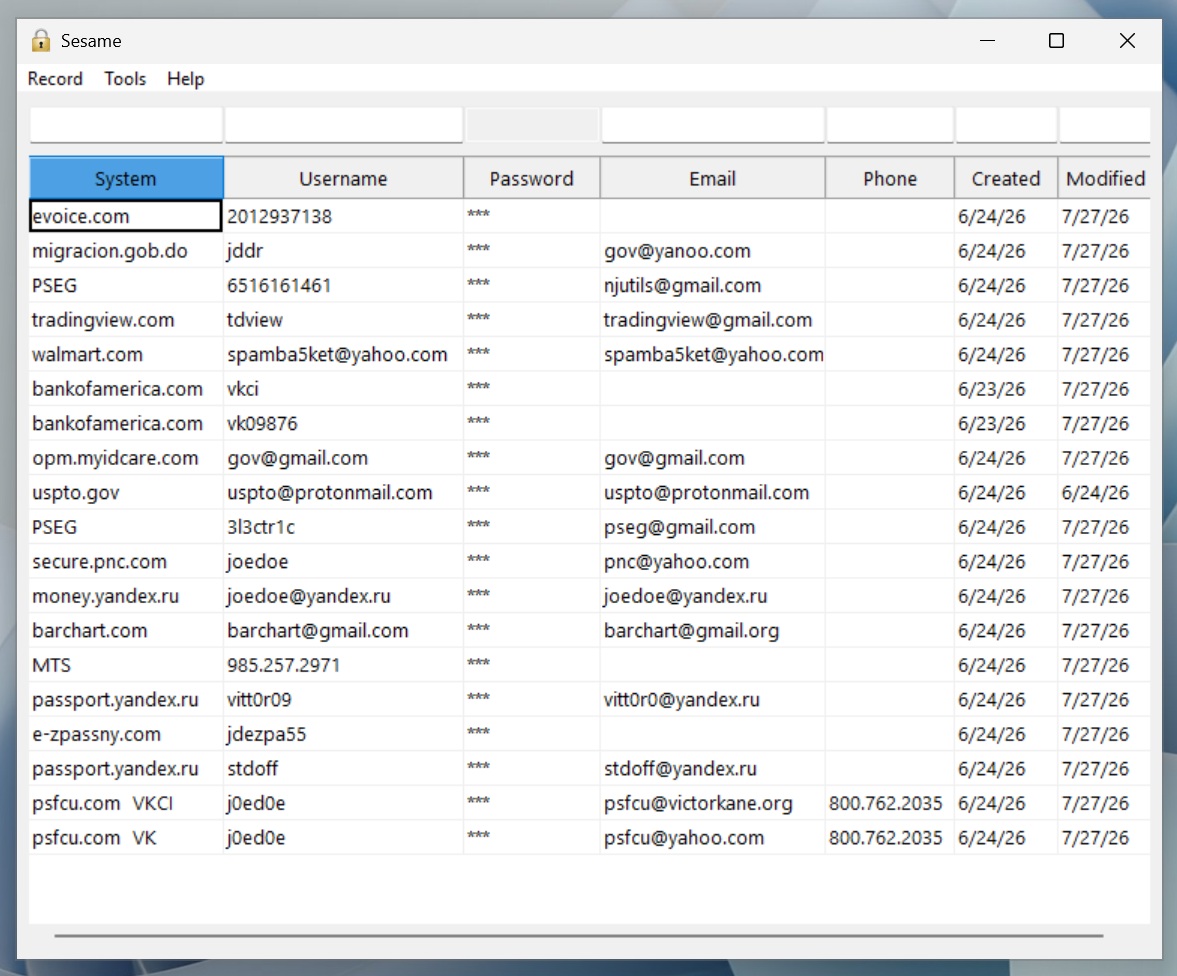
All columns of the main form, except System, are encrypted twice - at a datafile and at a cell level. This doubles NSA's
"gold standard" - AES-256 - for Top Secret & Secret information.
Every cell's encrypted value is “spoofed” with salt and nonce - same password in different rows looks completely different
until decrypted.
Decrypted data NEVER touches disk, it exists only in memory - a succesful eavesdropping would need much more
elaborate attack than a simple file theft.
The whole password column gets completely decrypted only for export. During normal operation only one cell at a time makes
it to clear text. And even that is never exposed to clipboard or other Windows reveal fan-outs and stored in a guarded memory buffer -
a different process (application), even under the same user account, won't be able to read it.
To top it off, Sesame surrounds every memory allocation with an ample “DMZ” to make buffer overflow attacks much harder
to mount
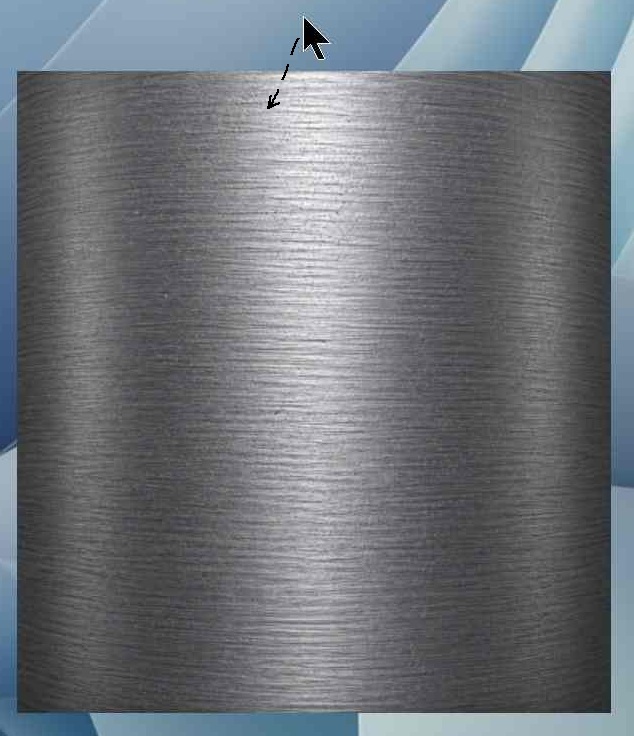
On launch you can have the steel plate hang on for as long as you like but once you pass your mouse pointer over it
and login form opens up timer starts ticking - you have 60 seconds to make it right. If you feel you can't, better exit and
do it later. That would save you a failure count. Letting it sit and time out after 60 seconds is counted as a login
failure - same as a wrong password. There are no warning messages and an intruder won't be tipped off re: bad password,
Sesame would just time out after 60 seconds.
3 failures within an hour lock up Sesame for 24 hours. I won't disclose here how Sesame “knows” about failures, it uses
hundreds of possible ways, a few of which are randomly deployed at a lock up. Reverse engineering is rather unfeasible.
Which serves one of Sesame's base premises: availability is subordinate to confidentiality.
To intersept one of the most likely leak channels, Microsoft Notepad is banned from possible recipient applications
to discourage "temporary" storage and prevent owner assisted security breach.
Interface.
I created Sesame under assumption that its user will sit in a very insecure environment. Imagine yourself in a high traffic
isle where many passers by look at your screen and despite of that you need to get your work done while you can't allow them to get
even a glimpse at your sensitive data. Count in a long weekend janitor trying to break into your password manager also...
Sesame was created to withstand all that head wind.
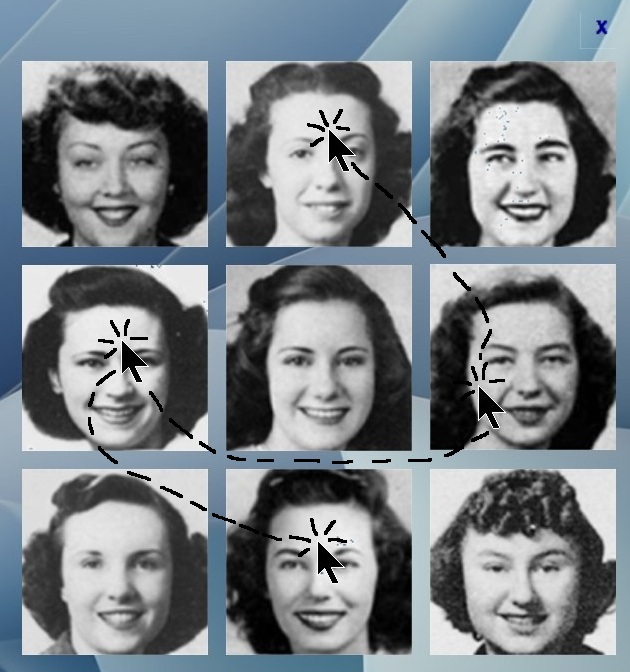
Every click on an image instantly shuffles all of them, on left key down event, not double-click, so that the “spy” behind your
shoulders has no chance to memorize the image that was just clicked. More, I made login form look like a photo collage of your high
school girlfriends, so that someone who never saw Sesame would not suspect it to be a password manager app.
Optional text part of master password allows more allusive techniques - every instance of Key 2 will be REMOVED from Key 1
before Key 1 is used as a part of master password. More ways to mislead your accidental “spy”.
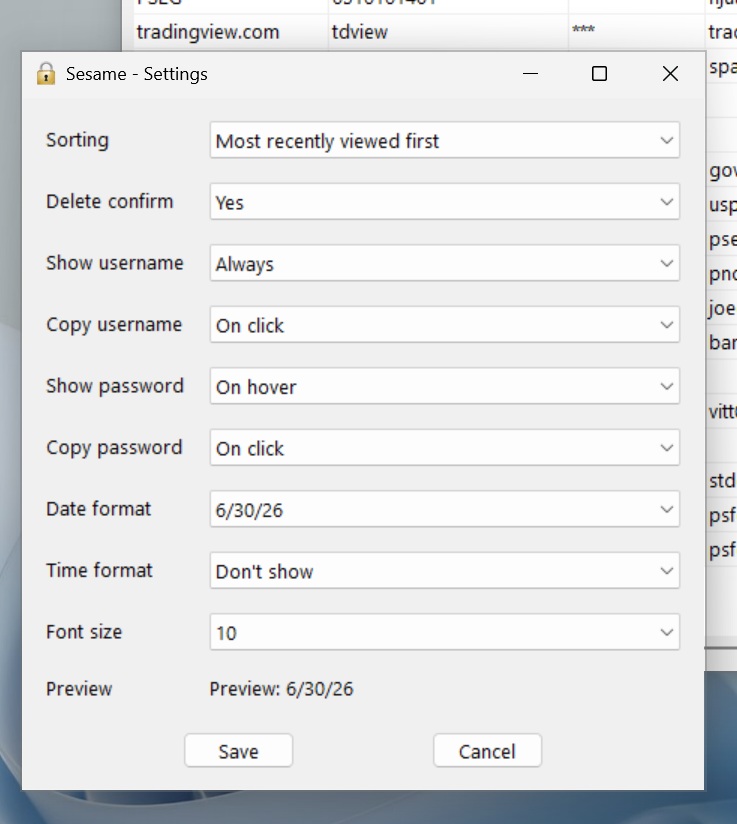
Tools->Settings allows a few different display modes of most sensitive fields - username and password. You can operate
full cycle without ever revealing those to you “spy”.
A gray highlight flash for ¼ of a second is an indication of ARM operation - the value will be stored in a secure, guarded
memory buffer until "fire" event - the next left-click (into a recipient textbox). It will be zero-erased on transfer event or
at 60 seconds timeout. This transfer doesn't use Windows clipboard and avoids all asociated security risks.
The main form has a column chooser - right-click on any header to invoke. Left-click on a header will alternate between
alphanumeric ascending/descending sort by that column.
A text box above each header is a search box. It is case insensitive
and fully supports regular expressions (std::regex flavor). A search on a hushtag "#redundant" will filter out all unique values
in a column and show only... redundant ones. The Password column doesn't have a search box, click on its header won't sort.
Both functions are disabled as a security measure. The entire column would have to be decrypted for search or sorting which
may expose most sensitive data to threats yet unknown today.
Ctrl+6 will alternate between full view and records not active for the past 6 month. Helpful feature to weed out old, stale,
unneeded records.
It's relevant to mention how Sesame counts days, these are not calendar days but active days. A day is marked active if any of these
took place during that day: a completed transfer of username/password or record open/add/edit event. When you don't use Sesame those days
don't age your database.
A record use statistics in "Most recently used first" sorting order in settings are made of the same events that define an active day,
but specific to the record.
The effort to move a password from encryptet vault to a recipient application cannot be improved upon: hover + click.
Save your failing Ctrl button for other password managers.
Deleting a record doesn't remove it but marks as deleted. It won't show up in the list any more, but you can view deleted records by
alternating between Ctrl+1 and Ctrl+2 or choosing the view from View menu. Deleting a record from Deleted view permanently removes it from
the database.
Ctrl+Shift+A or Tools->"Activity report" will show selected record's activity counts per date for its whole history in the database for
the past 6 months.
Ctrl+Shift+C performs scopy (secure copy) of selected text using the same channel as username and password - without the clipboard,
transiting the subject text in a secure buffer that gets overwritten with zeros after first (left) click or 60 seconds (whichever comes
first). This also defeats those stupid "secure" web forms that block clipboard paste and insist that you type instead.
The rest of the menus/functions are obvious and intuitive. Be careful with export files - they hold unencrypted data.
Use them only for a short hold over time. Do not use them as a backup.
 -->
-->
Long version.
Sesame works in its local directory, wherever you place it. Its executable is totally portable - doesn't depend on any DLLs, doesn't
need installation. But there is one hard pre-requisite: the 9 image files must be in the same directory. They can be anything, but the app
is optimized for 304x304 pixel images. Keep in mind - a single pixel changes = your data is gone! SHA digest of these files is used
to construct encryption key.
Guard those images as careful as sesame.db.enc itself, make a backup, save in several locations, copy them to 5 flash drives and
give to your in-laws and cousins for safe keeping.
sesame.db.enc is an encrypted disk image of Sesame's in-memory decrypted datafile. sesame.db.enc.bak is created on every memory->disk
flash (AKA successful exit) and used for restore operation when sesame.db.enc is dimmed corrupt. Be mindful of these two files.
Why memory? A disk file is easy to steal. To copy in memory structures a potential intruder would need to launch a much more
sophisticated attack.
What is so unique?
Human memory is not a single register as is the case of a computer memory. It combines several areas,
and the more the subject yields the more of them are involved in remembering.
The subject.
That's where a huge difference lies. A number yields only one facet - value. An image - several:
- color
- shape
- texture
- spatial layout
- object identity
- semantic meaning
- emotional content
Every one of these becomes another retrieval cue. Images generally produce much stronger and more
durable memories than isolated words or numbers.
This is known as the picture superiority effect - one of the most replicated findings in cognitive psychology.
People typically remember pictures significantly better than equivalent words because pictures are encoded
in multiple ways. Words often receive mainly semantic encoding.
This idea is explained by Dual Coding Theory, proposed by Allan Paivio. Images create both a visual memory trace and
a verbal/semantic trace, while words often produce only the latter.
Many experiments have shown that people can recognize thousands of previously seen photographs with remarkably high
accuracy — even after seeing each image only once. Memory researchers often describe this as richer encoding rather than
simply "better vision."
And human faces occupy a very special category!
The human brain contains specialized machinery devoted to recognizing faces.
Among the important brain regions is the Fusiform Face Area, located in the temporal lobe.
People can often recognize someone after years, faces despite aging, faces under different lighting, faces from different angles.
From an evolutionary perspective this makes sense. Recognizing family, allies, enemies, infants, emotional
expressions had enormous survival value.
Faces vs. ordinary images.
Experiments suggest a rough ranking:
1. Human faces
2. Meaningful scenes
3. Familiar objects
4. Symbols
5. Words
6. Random numbers
This is not an absolute law, because emotional significance, repetition, and context can dramatically change memorability.
But this hierarchy consistently holds in the most general case.
The neurological reason.
Modern neuroscience views memory as distributed networks, not stored photographs.
When you remember your grandmother's face, your brain reconstructs information from multiple areas:
- visual cortex
- temporal cortex
- emotional centers such as the Amygdala
- language areas
- association cortex
The memory is reconstructed rather than replayed like a photograph.
Human long-term memory is highly optimized for meaningful visual information, with human faces receiving particularly
specialized and powerful processing.
This is why you won't forget 4 or 5 of those 1930th beauties you'd choose for your password. Will you be able to pass your
password to someone on the phone? Uh-m-m... If you're both psychology PhDs and artists at once - maybe.
Cryptography.
A casual hacker may deploy a GPU to crack stolen encrypted material. Which yields ~10⁵ guesses/sec. An attacker doesn't
brute-force blindly - they run dictionary + rules + masks first. So an attack's effectiveness can be estimated two ways:
1. A password is human-memorable (a word, a name, a date): assume it falls to a wordlist-plus-rules attack.
rockyou.txt (14M entries) plus common mangling rules runs in minutes to hours even at 10⁵/sec. Treat any such password
as broken against a motivated attacker. Full stop. The iteration count buys you a few hours, not security.
2. A password is random, compute the space as charset_size ^ length: charset ≈ 95 (full printable ASCII),
62 alphanumeric, 26 lowercase. Then divide by your chosen throughput.
Now assume a serious cloud burst, ~100 GPUs: ~10⁷/sec... Random 95-charset password, against the 10⁷/sec adversary:
8 chars: 95⁸ ≈ 6.6×10¹⁵ → ~10 years average. Marginal — falls to a nation-state
10 chars: 95¹⁰ ≈ 6×10¹⁹ → ~10⁵ years. Safe against anything realistic
12 chars: 95¹² ≈ 5.4×10²³ → heat-death territory
A clean way to express the same is entropy bits: log2(search_space). Each bit doubles the time. Against a 10⁷/sec
attacker, you cross "centuries" at roughly 70 bits, which is ~11 random lowercase chars, ~9 random alphanumerics
with symbols, or a 5–6 word diceware passphrase.
Sesame's effective password is always 512 bits and it's easy to remember.
The photos used in Sesame were chosen very similar in basic settings on purpose, so that you couldn't give your password on the phone,
but very different in their facial features, so that everyone can come up with a rule serving as a hint. Doesn't one of them look like
Richard Nixon? Another like Alexander Kerensky? Winston Churchill? Walter Matthau, Barbara Stanwyck, Marilyn Monroe, Judy Garland,
John Candy, Olivia de Havilland?..
Vulnerabilities addressed in 1.5:
- Cross-process broadcast
- Clipboard history
- Cloud sync leaks
- Shrinked residency
- Closed passive channels
- Replaced C's memset() with SecureZeroMemory() and OPENSSL_cleanse() from OpeSSL library
- Locked key material against paging and crash dumps
- Stopped C++ string / GUI fan-out on the reveal path (up to 5 uncleaned heap copies)
- Removed the clipboard broadcast and the persistent GUI copy entirely
- Replaced clipboard medium with direct input.
All this defeats snapshots, dumps, swaps, and opportunistic scrapers.
Changes in 1.7:
- Added "Recycle bin"
- Added activity report
Changes in 1.8:
- Narrowed down a list of activity events, collected in statistics table, down to a completed transfer of username/password and
record open/add/edit.
Changes in 1.9:
- Added Ctrl+Shift+C scopy
License
Sesame is licensed under the WebX LLC Software License, distributed in LICENSE.txt with the download. The license permits
free use, including commercial use by individuals, consultants, managed service providers and any organizations of any size.
It prohibits redistribution, resale, and inclusion in products or services sold to third parties.
By downloading or using Sesame, you agree to the terms of the license.
Full license: LICENSE.txt